Workato vs. Celigo: The 2026 Comparison Guide (And the #1 Alternative)

The iPaaS (Integration Platform as a Service) market in 2026 is crowded. For many North American mid-market and enterprise teams, the shortlist often comes down to two prominent names: Workato and Celigo.
Both platforms are powerful, but they serve fundamentally different masters. Workato positions itself as an enterprise-wide automation hub, while Celigo has carved out a niche as the go-to solution for e-commerce and SaaS-centric businesses.
But what if your needs fall somewhere in between? What if you need enterprise-grade data stability without the complexity of a massive IT project?
In this guide, we’ll break down the strengths of Workato and Celigo and introduce a third option, Lumino, which is rapidly gaining traction as the intelligent, no-code alternative for agile enterprises.
At a Glance: The Core Difference
- Workato is best for large organizations that want to automate business processes (e.g., "When a deal closes in Salesforce, post to Slack and create a project in Asana"). It blends integration with robotic process automation (RPA).
- Celigo is best for mid-sized companies—especially in retail and e-commerce—that need pre-packaged integration apps (e.g., "Connect Shopify to NetSuite") to get running quickly.
Deep Dive: Workato
The "Enterprise Automation" Giant
Workato is frequently named a "Leader" by analysts because of its massive feature set. It focuses on "Enterprise Automation," promising to let business teams build complex workflows (called "Recipes") without IT support.
Where Workato Wins:
- Broad Automation: It handles not just data syncs, but also chatbots (Slack/Teams) and human-in-the-loop workflows.
- Community Library: A massive library of community-generated recipes means you rarely start from scratch.
Where Users Struggle, The "Ruby Trap":
While Workato is marketed as no-code, the reality for complex integrations is different.
- The "Formula Mode" Cliff: To perform data transformations, complex logic, or manipulate JSON payloads, Workato often requires users to use "Formula Mode." Under the hood, this is Ruby scripting.
- The Hidden Cost of "Low-Code": This creates a dangerous dependency. A Marketing Ops manager might build a workflow that works great until they need to parse a complex date format. Suddenly, they are blocked because they don't know Ruby.
- Maintenance Debt: You end up with a library of "No-Code" recipes that are actually full of custom snippets. If the person who wrote that Ruby script leaves, you are left with "black box" integrations that no one on the business side can fix.
Deep Dive: Celigo
The E-Commerce & SaaS Specialist
Celigo helps organizations "just connect X and Y." It is famous for its "Integration Apps"—pre-built, fully managed integration templates that act more like installed products than custom workflows.
Where Celigo Wins:
- Speed to Value: If you need standard connections (like Salesforce to NetSuite or Amazon to Acumatica), Celigo’s templates can get you live in record time.
- Mid-Market Focus: It is generally more affordable and approachable than Workato for mid-sized businesses.
- SaaS-Centric: It excels at connecting modern cloud applications without needing a heavy implementation project.
Where Users Struggle:
- Limited Customization: Celigo is fantastic if you stay within the "rails" of their templates. However, complex, bespoke enterprise logic or heavy on-premise integration can challenge the platform.
- Lack of Native Intelligence: Compared to newer platforms, Celigo’s approach is template-driven rather than AI-driven. It relies on manual configuration for mapping and errors rather than predictive intelligence.
The Third Option: Why Agile Teams Are Choosing Lumino
If Workato feels too expensive and you don't have a Ruby developer on your Operations team, Lumino is the answer.
Lumino is the true no-code alternative. We believe that "No-Code" shouldn't mean "Low Power" and it definitely shouldn't mean "surprise coding."
1. True No-Code (No Hidden Scripting)
Workato forces you into Ruby for complexity; Celigo often relies on Handlebars or JavaScript.
- The Lumino Difference: Lumino’s Rule Designer allows you to build complex transformations (like nested loops, cross-reference lookups, and conditional formatting) entirely through visual configuration.
- Why It Matters: Your Operations team can own the entire stack. You never hit a "complexity cliff" where you have to stop building and call a developer.
2. Intelligence Built-In, Not Bolted On
While competitors rely on static templates, Lumino uses an AI Inference Layer.
- The Lumino Difference:
- Schema-Aware Mapping: Lumino automatically detects field matches and validates data types in real-time.
- Log Analyzer: Instead of cryptic error codes, Lumino uses AI to tell you exactly what broke (e.g., "The 'Order ID' field is missing") and how to fix it—no debugging scripts required.
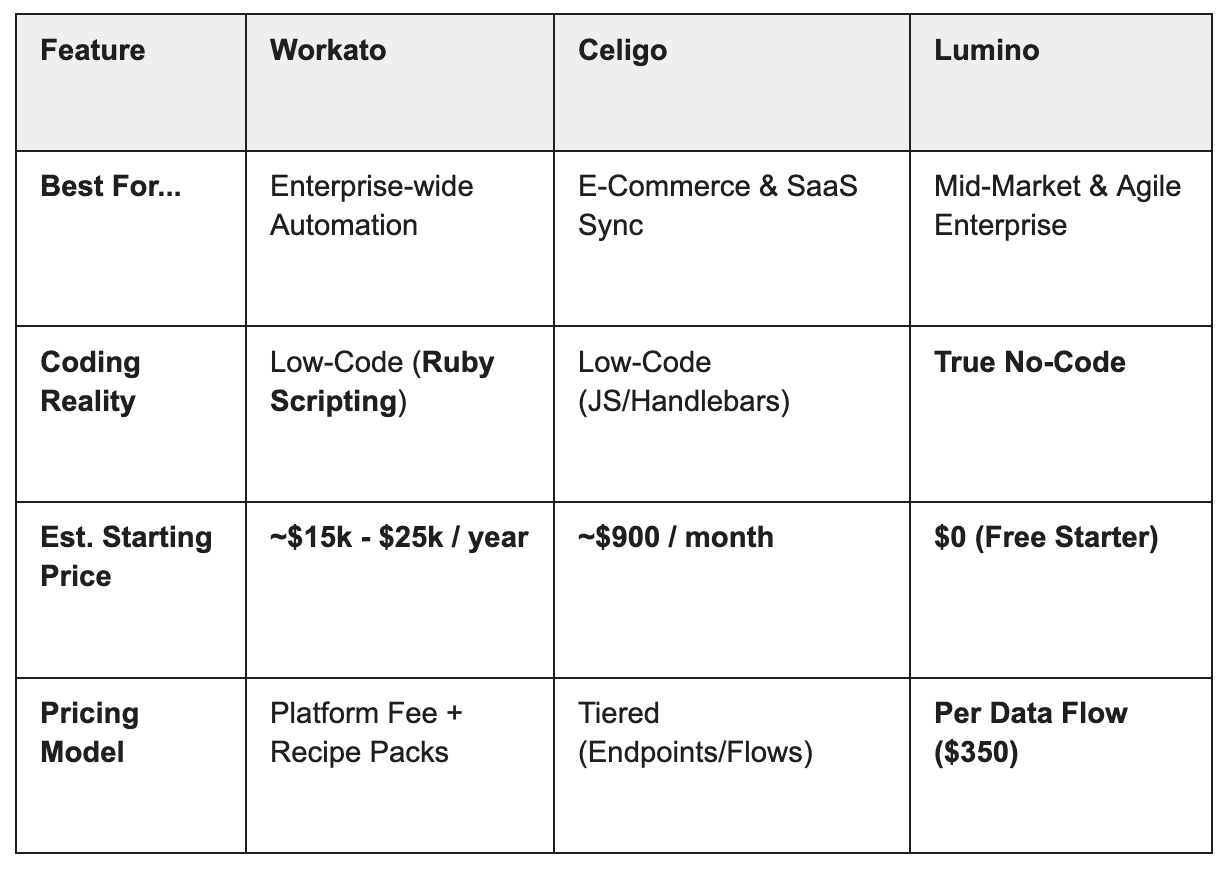
Comparison Summary
Recommendation
- Choose Workato if you have a large budget and need to automate complex human workflows (like HR onboarding bots) across a massive enterprise.
- Choose Celigo if you are a retailer running Shopify and NetSuite and want a "plug-and-play" connector with minimal customization.
- Choose Lumino if you need a flexible, intelligent platform to connect your enterprise systems without hiring developers or breaking the bank.
Ready to see the difference? Lumino offers a 30-day free trial so you can experience intelligent integration firsthand. Start building your first flow today.
Newsletter Sign-up
Sign up with your email address to receive news and updates
We respect your privacy.