Tray.io vs. Workato: The 2026 Comparison Guide (And the #1 Alternative)

For modern, tech-forward companies, the search for an automation platform usually narrows down to two "cool kids" on the block: Tray.io and Workato.
Both platforms have successfully disrupted the market by promising to kill the clunky, developer-heavy middleware of the past (like MuleSoft). They both offer sleek UIs, cloud-native architectures, and a promise of "democratizing automation."
But beneath the marketing polish, a dirty secret remains: to do anything complex in either tool, you often have to stop dragging-and-dropping and start writing scripts.
In this guide, we compare Tray.io and Workato to help you decide—and introduce Lumino, the platform that finally delivers on the promise of True No-Code.
At a Glance: The Core Difference
- Tray.io is the "Flexible Low-Code" challenger. It is beloved by SaaS startups and technical operations teams because it offers granular control and a "builder-friendly" visual interface, often seen as more flexible than Workato but requiring more technical logic.
- Workato is the category leader for "Enterprise Automation." It blends integration with chat-bots and human workflows, aiming to automate entire business processes across large organizations.
Deep Dive: Workato
The "Recipe" Giant
Workato calls its workflows "Recipes" and has built a massive community around sharing them. It is designed to look simple but scale to enterprise needs.
Where Workato Wins:
- Community Library: Workato’s library of pre-built recipes is unmatched. If you need a standard "Salesforce to Slack" notification, you can likely find it pre-made.
- "Bot" Automation: Workato excels at "Workbot" functionality—allowing users to trigger workflows directly from Slack or Microsoft Teams (e.g., approving a PO without leaving chat).
- Governance: IT teams love Workato’s "Recipe Lifecycle Management" for handling dev/test/prod environments securely.
Where Users Struggle: The "Ruby Trap"
While Workato is marketed as no-code, the reality for complex integrations is different.
- The "Formula Mode" Cliff: To perform data transformations, complex logic, or manipulate JSON payloads, Workato often requires users to use "Formula Mode." Under the hood, this is Ruby scripting.
- The Hidden Dependency: A Marketing Ops manager might build a workflow that works great until they need to parse a complex date format. Suddenly, they are blocked because they don't know Ruby.
Pricing: Workato’s pricing model is geared toward the enterprise. Base workspaces start around $15,000–$25,000/year, but with recipe packs, average mid-market deals often push $35,000+.
Deep Dive: Tray.io
The Technical Builder’s Choice
Tray.io offers a visual canvas that feels more like drawing a flowchart. It gives users individual control over loops, boolean logic, and API calls.
Where Tray.io Wins:
- Visual Flexibility: Tray’s interface is praised for being "what you see is what you get." You can visually map out incredibly complex logic branches that other tools hide behind menus.
- Embedded Integration: Tray is a leader in "Embedded iPaaS"—allowing SaaS companies to white-label Tray’s engine to offer integrations to their own customers.
- Granular Control: For technical users who understand JSON and API structures, Tray offers a satisfying level of direct control over the data payload.
Where Users Struggle:
- Complexity Creep: Tray’s flexibility is a double-edged sword. Simple workflows can quickly become massive, sprawling "spaghetti" diagrams that are hard to debug or hand off to a non-technical colleague.
- Scripting Reliance: Like Workato, Tray frequently relies on Python or JavaScript snippets to handle edge cases. It is a "Low-Code" tool, not a "No-Code" tool.
- Cost: While creating a trial is easy, enterprise capabilities quickly become expensive, with opaque quote-based pricing that rivals Workato.
The Third Option: Why Ops Teams Are Choosing Lumino
If you are tired of trading one scripting language for another, Lumino is the answer.
Lumino is the True No-Code alternative. We believe that "No-Code" shouldn't mean "Low Power." It means the platform handles the complexity so you don't have to.
1. True No-Code (No Ruby, No Python)
Workato forces you into Ruby; Tray often needs Python/JS.
- The Lumino Difference: Lumino’s Rule Designer allows you to build complex transformations (like nested loops, cross-reference lookups, and conditional formatting) entirely through visual configuration. We removed the "scripting trap" so Business Ops can truly own their infrastructure.
2. AI-Native Maintenance
Tray and Workato rely on you to catch errors.
- The Lumino Difference: Lumino’s Log Analyzer uses AI to monitor your integrations. When a workflow fails, it doesn't just send an alert; it diagnoses the root cause (e.g., "API rate limit exceeded" or "Data type mismatch") and suggests the fix in plain English.
3. Predictable, Scale-Friendly Pricing
Workato’s pricing can skyrocket as you add automated tasks.
- The Lumino Difference: Lumino offers a transparent subscription model based on Data Flows. You can run high-volume transactions without fear of a massive overage bill at the end of the month.
Comparison Summary
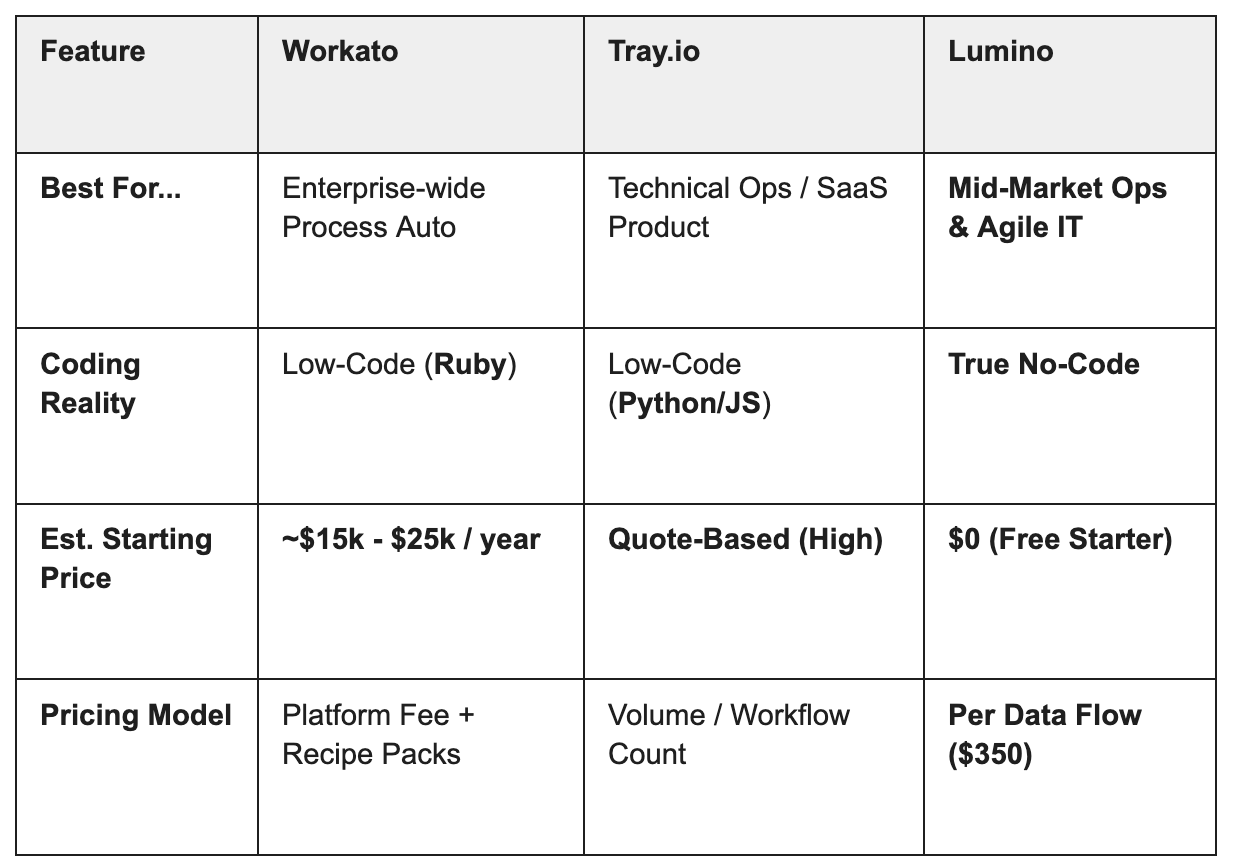
Recommendation
- Choose Workato if you have a large budget and need to automate complex human workflows (like HR onboarding bots) across a massive enterprise.
- Choose Celigo if you are a retailer running Shopify and NetSuite and want a "plug-and-play" connector with minimal customization.
- Choose Lumino if you need a flexible, intelligent platform to connect your enterprise systems without hiring developers or breaking the bank.
Ready to see the difference? Lumino offers a 30-day free trial so you can experience intelligent integration firsthand. Start building your first flow today.
Newsletter Sign-up
Sign up with your email address to receive news and updates
We respect your privacy.