Jitterbit vs. SnapLogic: The 2026 Comparison Guide (And the #1 Alternative)

For mid-sized companies that have outgrown simple tools like Zapier but aren't ready for the complexity of MuleSoft, the search often lands on Jitterbit or SnapLogic.
These platforms promise "speed" and "ease of use." But in 2026, the definition of "ease" has changed. Is a low-code tool that still requires scripting actually "easy"?
In this guide, we compare Jitterbit and SnapLogic to help you decide—and introduce Lumino, the platform redefining what "ease of use" means through AI and true No-Code.
At a Glance: The Core Difference
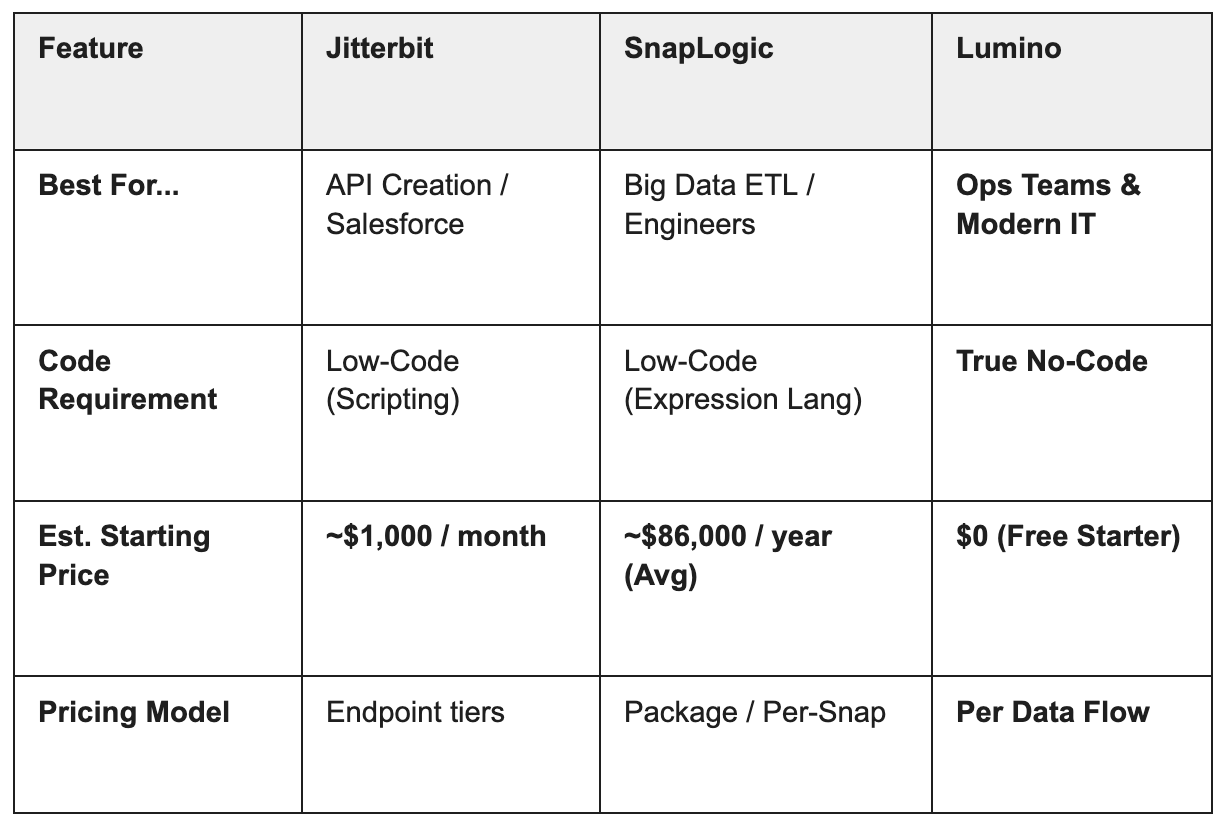
- Jitterbit is a veteran player focused on Salesforce integration and API creation. It’s a reliable "low-code" tool often found in mid-market manufacturing and higher-ed.
- SnapLogic positions itself as a modern "iPaaS for the enterprise," with a focus on data integration (ETL) and big data pipelines, often used by data engineering teams
Deep Dive: Jitterbit
The "Steady Hand" for APIs
Jitterbit Harmony is known for simplifying the process of connecting SaaS apps and exposing them as APIs.
Where Jitterbit Wins:
- API Creation: Jitterbit makes it relatively easy to turn an integration workflow into a published API that others can use.
- Mid-Market Pricing: It is generally more affordable than the top-tier enterprise tools, making it accessible for $50M-$500M revenue companies.
Where Users Struggle:
- "Scripting" Disguised as Low-Code: While the UI is visual, complex transformations often force users into Jitterbit’s proprietary scripting language. This creates a hidden technical debt.
Dated UX: Long-time users often note that the interface feels like software from a previous generation, lacking the fluidity of modern SaaS apps.
Deep Dive: SnapLogic
The Data Engineer’s Choice
SnapLogic uses a "Snaps" (connector) metaphor and is powerful for moving massive amounts of data into data warehouses (Snowflake, Redshift).
Where SnapLogic Wins:
- Data Volume: If your primary use case is ETL (extracting heavy data for analytics), SnapLogic handles batch processing better than most application integration tools.
- AI Assistants: SnapLogic was an early adopter of AI (Iris), offering "suggested next steps" in their pipeline builder.
Where Users Struggle:
- Complexity for Business Users: SnapLogic is powerful, but it is built for data engineers, not business operations. The learning curve is steep for non-technical staff.
Cost: While faster than legacy tools, SnapLogic’s pricing has crept up, pushing it out of reach for many mid-market teams.
The Third Option: Why Modern Teams Are Choosing Lumino
If Jitterbit feels too "old school" and SnapLogic feels too "data engineering heavy," Lumino offers the perfect balance.
Lumino is the Consumer-Grade UX solution for enterprise integration. We believe you shouldn't need a PhD in data engineering to connect your systems.
1. True No-Code (No Proprietary Scripts)
Jitterbit and SnapLogic often require you to learn their specific scripting languages to do advanced work.
- The Lumino Difference: Lumino utilizes a Visual Transformation Builder. Whether you are doing simple mapping or complex logic branches, it is all done via point-and-click configuration. We lower the barrier to entry so your Operations team can own the data.
2. Intelligent "Self-Healing" Integrations
SnapLogic has AI, but it focuses on building. Lumino applies AI to maintenance.
- The Lumino Difference: Lumino’s Log Analyzer doesn't just log errors; it explains them. If a connection breaks, our AI provides a plain-language root cause analysis, meaning you spend less time debugging and more time innovating.
3. A Modern, Unified Interface
No bouncing between different "studios" or legacy apps.
The Lumino Difference: Lumino offers a single, unified Designer Canvas for API management, data integration, and workflow automation. It is designed with the usability of 2026 software, not 2015 middleware.
Comparison Summary
Recommendation
- Choose Workato if you have a large budget and need to automate complex human workflows (like HR onboarding bots) across a massive enterprise.
- Choose Celigo if you are a retailer running Shopify and NetSuite and want a "plug-and-play" connector with minimal customization.
- Choose Lumino if you need a flexible, intelligent platform to connect your enterprise systems without hiring developers or breaking the bank.
Ready to see the difference? Lumino offers a 30-day free trial so you can experience intelligent integration firsthand. Start building your first flow today.
Newsletter Sign-up
Sign up with your email address to receive news and updates
We respect your privacy.